

MrPunter App for UK Mobile Users
Mr Punter App gives UK users mobile access to 5,000+ games, the full cashier, and 24/7 live chat from one browser-based setup. Players can add a home screen shortcut through Chrome on Android or Safari on iOS and open the platform without extra installation. The mobile version keeps the same core features as desktop, with fast loading on standard UK connections and HD live dealer play on Wi-Fi.

Best Alternative Mobile Casinos
If you want to compare our mobile setup against other platforms before committing, several options serve UK players with a similar browser-based approach. Visit the Mr Punter homepage to see our current welcome package, game library, and payment options alongside any alternative you are considering. Our platform processes 89% of verified withdrawals within 4 hours and supports 15 payment methods including Visa, Mastercard, bank transfer, and 9 cryptocurrencies.









Mr Punter App Download Options
There is no MrPunter app download required to play on mobile. Our platform runs entirely through your browser using HTML5 technology, which means no APK file, no App Store listing, and no installation process. You get instant access to the full site by opening your browser, navigating to our official address, and playing directly from there. For players who want quicker repeat access, we recommend adding a home screen shortcut on both Android and iOS.
| Platform | Access Method |
| Android | Open in Chrome; add home screen shortcut via the three-dot menu |
| iOS | Open in Safari; tap the share button and select “Add to Home Screen” |
| Download required | None; browser-based play on all devices |
| Game access on mobile | Full catalogue of 2,500+ titles including live casino and sportsbook |
| Data usage (slots) | 50 to 100 MB per hour on standard sessions |
| Data usage (live casino) | 200 to 300 MB per hour on HD dealer streams |
| Cashier on mobile | Full deposit and withdrawal access from the mobile browser |
Once you add the shortcut to your home screen, the MrPunter app icon sits alongside your other installed apps and opens the site with a single tap. There is no version to update and no storage space used beyond the icon itself. The site automatically loads the latest version every time you open it, so you are always on the most current build without any manual action.
Android Installation Steps
Setting up the Mr Punter app shortcut on Android takes under a minute from start to finish. Chrome is the recommended browser for Android; it handles the home screen shortcut process in a few taps and the resulting icon works identically to a standard installed app.
- Go to the official site
Open Chrome on your Android device and go to our official website address.

- Tap the three-dot menu at the top of the screen
Find the three-dot icon in the upper-right corner of Chrome and tap it to open the browser menu.
- Allow installation from the menu
Select ‘Add to Home Screen’ from the dropdown. If a prompt asks for permission to add shortcuts, confirm it to continue.
- Shortcut appears on your home screen
Confirm the name and tap Add. The MrPunter app icon now appears on your home screen for one-tap access from that point forward.
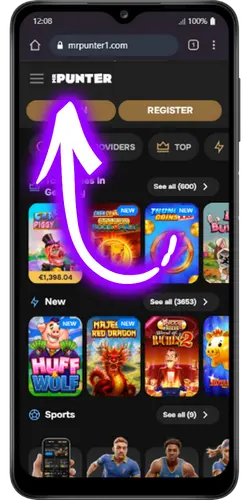
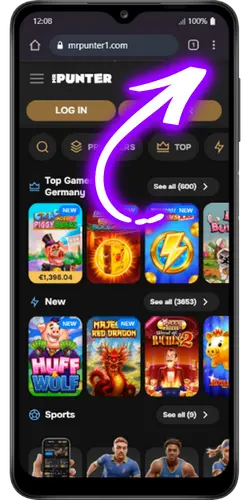
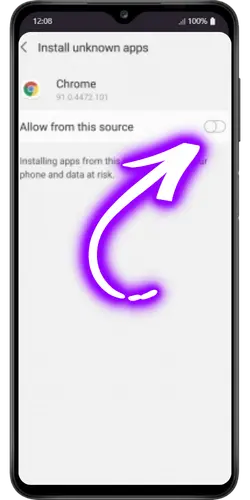
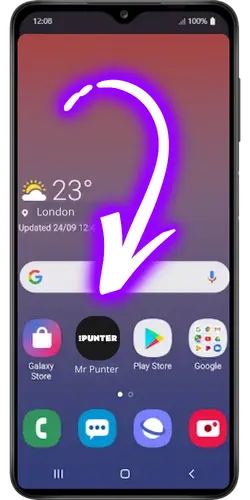
The shortcut launches the site directly without going through the Chrome browser interface each time. Your login session carries over automatically if you ticked Stay Signed In on your last sign-in, so returning players land straight in the lobby without entering credentials again.
How to Download the App on iOS Devices
On iPhone and iPad, the process runs through Safari rather than Chrome. The iOS share sheet handles the shortcut creation in 4 taps, and the resulting icon on your home screen is indistinguishable from a standard App Store app in terms of appearance and behaviour.
- Go to the official site
Open Safari on your iPhone or iPad and go to our official website address.
- Tap the share button at the bottom of the screen
Tap the share icon the square with an upward arrow in the bottom bar of Safari to open the share sheet.
- Tap the plus icon Add to Home Screen
Scroll through the share sheet options and tap ‘Add to Home Screen’ to begin creating the shortcut.
- Shortcut appears on your home screen
Confirm the name and tap Add in the top-right corner. The Mr Punter app icon is now on your home screen and opens the site instantly on every tap.
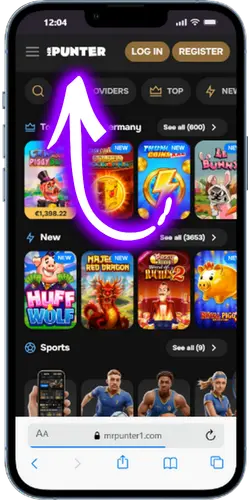
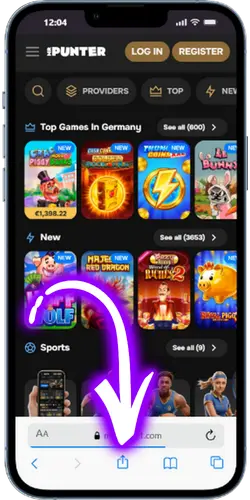
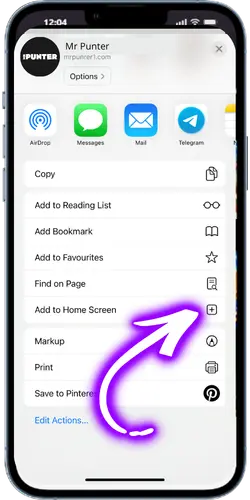
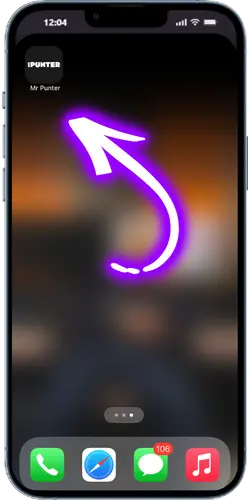
Safari is the only browser on iOS that supports the Add to Home Screen function for web shortcuts. Using Chrome or Firefox on an iPhone will not produce a working home screen icon for our site, so the steps above specifically require Safari to complete correctly.
Mr Punter App System Requirements and Device Limitations
Because the MrPunter app runs in your browser rather than as a native install, the system requirements are lower than most standalone casino apps. Any device capable of running a modern browser at a stable speed will handle the full game catalogue, including live dealer streams, without performance issues.
| Requirement | Specification |
| Android browser | Chrome 90 or later |
| Android OS | Android 8.0 or later |
| iOS browser | Safari 14 or later |
| iOS version | iOS 13.0 or later |
| Recommended RAM | 2 GB or more on both systems |
| Minimum connection for slots | 4G or stable Wi-Fi |
| Minimum connection for live casino | Stable Wi-Fi recommended; HD streaming uses 200 to 300 MB per hour |
| Storage required | None for the shortcut; browser cache handled automatically |
Devices manufactured before 2018 may experience slower load times on graphically intensive live dealer games. For standard slots and table games in RNG format, performance on older hardware remains consistently reliable on both Android and iOS as long as the browser version meets the minimum listed above.
App Updates and Version Management
One practical advantage of our browser-based Mr Punter over a native downloaded app is that version management requires no input from you. Every time you open the shortcut on your home screen, the latest version of our platform loads automatically. There are no update notifications, no App Store approval delays, and no risk of playing on an outdated build.
- Automatic updates: The site loads the current live version on every session open; no manual update or reinstall is ever needed.
- No storage accumulation: Unlike native apps that grow in size with each update, our browser shortcut takes up no device storage beyond the icon itself.
- Cache management: Your browser handles cache automatically; clearing it occasionally if the site feels slower than usual takes under 10 seconds in browser settings.
- Cross-device sync: Log in on a different device and your account state, bonus progress, and transaction history are all current in real time.
- No rollback risk: Because updates go live server-side, there is no risk of a broken local install or a version conflict between your device and our servers.
- Notification alternative: Since browser shortcuts do not send push notifications, opt in to email alerts in your account settings to receive news about bonus updates and new game releases.
If you notice the site not loading correctly after a browser update on your device, clearing the cache in your browser settings resolves the issue in most cases. Our 24/7 live chat responds within seconds and can walk you through any access issue that does not resolve with a standard cache clear.
FAQ
There is no Mr Punter app in the Google Play Store or Apple App Store. Our platform runs entirely through your mobile browser using HTML5 technology, which means you access the full site without any download. You can add a home screen shortcut through Chrome on Android or Safari on iOS to get one-tap launch access that works identically to a standard app icon.
Open our official site in Chrome on your Android device, tap the three-dot menu in the top-right corner, and select Add to Home Screen. Confirm the name and tap Add; the MrPunter app shortcut appears on your home screen immediately. The whole process takes under a minute and requires no permissions beyond the standard browser shortcut function.
Yes. The full catalogue of 5,000+ games, all payment methods, every bonus and promotion, and live chat support are all accessible through the mobile browser version without any restrictions. Live dealer streams run in HD and the cashier handles deposits and withdrawals identically to the desktop experience. There is no reduced feature set on mobile.
No updates are ever required. Because the MrPunter app runs in your browser rather than as a local install, the latest version loads automatically every time you open the shortcut. There is no notification asking you to update and no App Store approval process between our development releases and what you see on your screen.
First, check that your internet connection is stable and that your browser meets the minimum version listed in our system requirements. If the site still does not load, clearing your browser cache in settings usually resolves the issue in under 10 seconds. For anything that persists beyond that, our live chat team runs around the clock and typically responds within seconds.